On the SSH Tectia Client menu bar, click Edit ->
Settings.... In the Settings dialog, select Profile Settings
-> Tunneling and select the Outgoing tab.
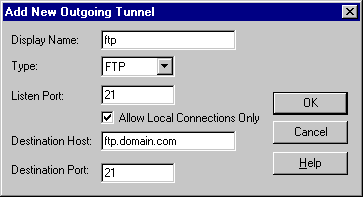
Click Add.
In the Name field, type for example ftp.
From the Type drop-down menu, select FTP.
In Listen Port, type 21.
In Destination Host, type the name of the FTP server (such as ftp.domain.com).
In Destination Port, type 21.
Click OK.
Figure : Tunneling an FTP connection to secure file transfer operations