SSH.COM is one of the most trusted brands in cyber security. We help enterprises and agencies solve the security challenges of digital transformation with innovative access management solutions.
 |  | |
 | ||
| ||
     |
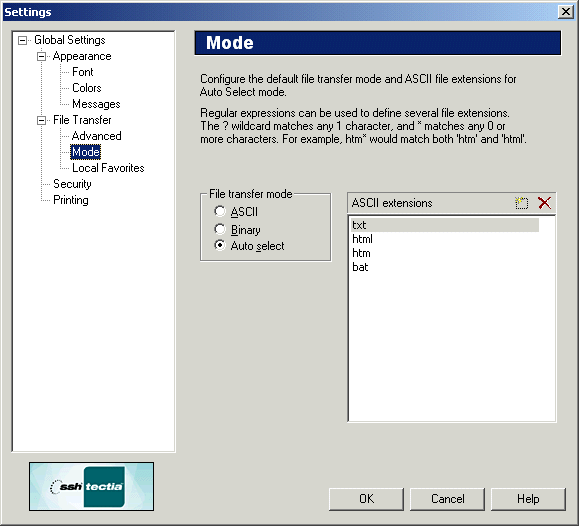
The Mode page of the Settings dialog affects which files are transferred using ASCII mode.
- File Transfer Mode
Select the default file transfer mode from the following options:
- ASCII Extensions
Files using a file extension specified in the ASCII Extensions list will be transferred using ASCII mode.
- New
Click the New icon (at the top right-hand side of the ASCII Extensions list) to add a new file extension to the list. The keyboard shortcut for the New icon is the
Inskey.Note that you can use wild cards to specify the file extensions. The
?character matches any 1 character, and the*character matches any 0 or more characters. For examplehtm*would match bothhtmandhtml.- Delete
Select a file extension entry from the list and click the Delete icon (at the top right-hand side of the ASCII Extensions list) to remove the extension. The keyboard shortcut for the Delete icon is the
Deletekey.
| |
Copyright  2008 SSH Communications Security Corp.
This software is protected by international copyright laws. All rights reserved.
Contact Information