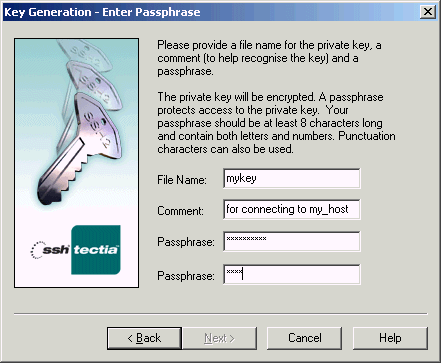
On the Key Generation - Enter Passphrase page you can provide
information describing the generated key pair, and protect the files
with a passphrase.
Figure : Entering a passphrase for a newly generated key pair
File Name
Type a name for the key file in the File Name field.
Comment
In this field you can write a short comment that describes the key pair.
You can for example describe the connection the files are used for. This
field is not obligatory, but can be quite useful.
Passphrase
Type a phrase that you have to enter when handling the key. This
passphrase works in a similar way to a password and gives some
protection for your private key.
Make the passphrase difficult to guess. Use at least 8 characters, both
letters and numbers. Any punctuation characters can be used as well.
Memorize the passphrase carefully, and do not write it down.
Passphrase
Type the passphrase again. This ensures that you have not made a typing error.
When you have typed the file name and typed the passphrase twice, you
can click Next to proceed to the next phase.